Background Setup screen
Select
from File -
New project menu. Also you may activate
this screen from File -
Open Main Image or
if you simply drag background image from Finder and drop it into
project background. Please note that you need to drop image into
background. If you drop image into a layer image will be embedded into
the layet.
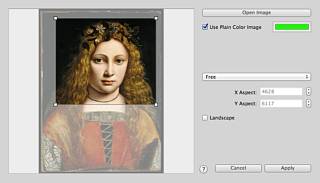
Setup page proportions using page sixe popup and/or X and Y Apects text boxes on
the right. Select desired part of background image by dragging and
resizing cropping box located over the background
image.
Also you may make "Plain color" background, that is background filled with some colour of your choice. Simply tick on Use Plain color Image checkbox and select a colour.
Also you may make "Plain color" background, that is background filled with some colour of your choice. Simply tick on Use Plain color Image checkbox and select a colour.