Add Layers Screen
To bring up this window please select from Menu Layers - Add Layers or use Add Layers button on the main screen.
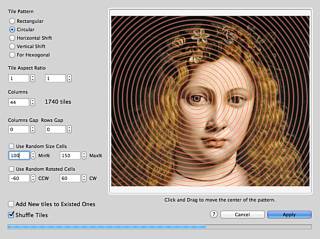
Tile
Pattern:
Rectangular
- Add tiles in a rectangular order.
Circular
- Add tiles placed in circular pattern. To move a center of the pattern
please click and drag on the image with your mouse.
Horizontal
Shift - Every odd layer line will be shifted to the half of single
layer width.
Vertical
Shift - Every odd layer column will be shifted to the half of
single layer height.
For
Hexogonal - Every odd layer line will be shifted to the half of
single layer width and
height
of the layer lines will be compressed to 0.75 of single layer height.
This is optimal layer distribution for layers with hexogonal or round
objects inside.
Tile
Aspect Ratio - Set tile width/height aspect ratio here.
Columns
- If you have selected to use Rectangular Tile Pattern this will be a
number of columns in mosaic. Number of rows will be calculated
automatically according with selected Tile Aspect Ratio.
If
you have selected Circular Tile Pattern this value will be used to
calculate the size of the single tile (according with selected Tile
Aspect Ratio) and program will place tiles of that size in the Circular
order.
Columns
Gap/Rows Gap - This option is active only in Rectangular Tile
Pattern mode. It will make a gaps between columns and rows.
Use
Random Size Cells - If this option is active program will use tiles
with sizes randomly enlarged or reduced.
Use
Random Rotated Cells - If this option is active program will use
random rotated tiles. This option is active in Rectangular Tile Pattern
mode only.
Note:
Negative
angles counts as a clockwise angles; positive angles are a contra
clockwise angles.
A
layer with zero angle is vertical placed layer.
Add
New tiles to Existed Ones - If this option is on a new layers will
be added to the already existed layers.
Shuffle
Tiles - If this option is on new tiles will be shuffled. You my
shuffle tiles manually selecting from menu "Edit"->"Shuffle Tiles"
?
- Opens this help page.
Cancel
- This will close dialogue with no tile adding.
Apply
- Press this button to add layers.